

How to Convert Any Page to RSS (No Plugin Needed)
- What’s the fastest way to convert a page to RSS?
- Why “just use a feed generator” seems like the obvious fix
- 1. The page has no consistent structure to scrape
- 2. You’re now maintaining a scraper, not reading news
- 3. Rate limits and blocks kill free tools at scale
- 4. Duplicate and near-duplicate content floods your feed
- From scraping pages to querying an API
- Getting started
- FAQ
Last Tuesday I needed to track a local city council’s news page for a client project. No RSS icon anywhere. No /feed URL. Just a plain HTML page that updated maybe twice a week with zero warning. I spent forty minutes trying three different browser extensions before I gave up and wrote my own scraper.
That’s the situation most people hit when they try to go from page to RSS: the site was never built to be machine-readable, and the tools that promise to fix that either break on the first layout change or cost more than the problem is worth. The problem wasn’t finding a tool. It was that most pages simply weren’t designed to be watched.
What’s the fastest way to convert a page to RSS?
The fastest reliable way is a feed-generation service that scrapes the page’s HTML structure and republishes it as a valid RSS/Atom feed on a schedule. For a one-off page, a free tool like RSS.app or FetchRSS works in under 10 minutes. For anything you need long-term or at scale, that same approach starts breaking down fast — more on why below.
Why “just use a feed generator” seems like the obvious fix
And it is, for a single page you check occasionally. You paste a URL, the tool guesses which elements are “articles,” and it spits out a feed link you can drop into any reader. No code, no server, no maintenance — for about a week. Then the site redesigns its homepage, or adds a cookie banner that shifts the DOM, and your feed either goes empty or starts pulling in the newsletter signup box as an “article.”
1. The page has no consistent structure to scrape
Feed generators work by pattern-matching repeated HTML elements — usually a list of divs with a similar class name. That works fine on a blog built with a template. It falls apart on a news homepage where the top story has a different markup than the sidebar list, which has different markup than the “trending” widget. You end up with a feed that’s half real articles, half navigation links.
Before
Feed generator guesses at page structure, breaks on layout changes, mixes navigation links into your “articles.”
After
One API call returns structured JSON — title, author, publish date, source — already parsed correctly.
2. You’re now maintaining a scraper, not reading news
Every time the target site ships a redesign, your feed silently degrades. Nobody emails you when that happens. You just notice three weeks later that you missed a story, and now you’re back to inspecting HTML in devtools to figure out what changed. This is the actual cost people don’t budget for: not the setup time, but the ongoing babysitting.
3. Rate limits and blocks kill free tools at scale
Most no-code feed generators poll the target page every 15–30 minutes. Do that across 40 sites and you’ll start tripping rate limits or outright IP bans, especially on sites with any bot protection. Free tiers cap you at a handful of feeds anyway — fine for a hobby project, not for anything resembling a product.
4. Duplicate and near-duplicate content floods your feed
If the story you care about gets picked up by wire services, you’ll often see the same event appear on the target page in three slightly different phrasings across a week. A scraped feed has no concept of “this is the same story” — it just re-emits every version it finds.
- Event happens. A source publishes the original story.
- Syndication spreads it. Wire partners and aggregators republish it with minor edits.
- Your scraped feed floods. You get several near-identical entries for one real event, with no way to collapse them.
From scraping pages to querying an API
At some point the honest question isn’t “which feed generator handles this page best” — it’s whether you should be scraping pages at all. If what you actually want is structured, reliable news data without babysitting a scraper every time a site redesigns, that’s a different tool than page-to-RSS conversion, and it solves the problem at a different layer.
That’s what LumenFeed is built for — a content aggregation API pulling from 100,000+ sources in 20+ languages, returning structured JSON instead of scraped HTML. Instead of pointing at one page and hoping the markup holds, you query by topic with the q parameter and get back parsed, deduplicated articles with fields like published_at and source_link already filled in.
Example request
curl -X GET "https://api.lumenfeed.com/api/v1/articles?q=city%20council&sort_by=date_desc&per_page=20" \
  -H "X-API-Key: your_api_key_here"
That single call replaces the scraper, the schedule, and the cleanup logic — no page structure to track, no layout change to monitor.
Getting started
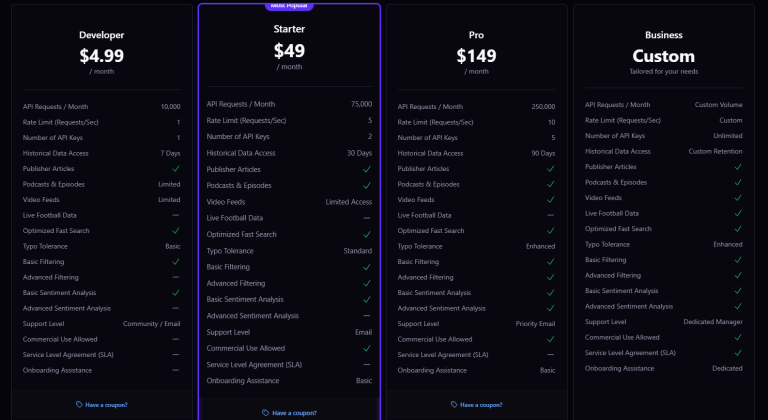
You can test this without committing to anything: the Developer plan is $4.99/mo for 10,000 requests, no card required to start, and every plan allows commercial use. If you outgrow it, Starter and Pro plans scale request volume and history depth without changing how you query.
Page to RSS
One page, fragile markup, manual monitoring, no dedup.
News API
Any topic, structured JSON, one endpoint, built-in dedup.
For background on how feed syndication actually works under the hood, the Wikipedia entry on RSS is a solid technical primer on the original spec this whole ecosystem is built around.
Frequently Asked Questions
Can I convert any webpage to RSS, even without a feed?
Technically yes — feed generator tools scrape the page’s HTML and repackage it as RSS. Reliability depends entirely on how consistent that page’s markup is, and it breaks whenever the site redesigns.
Is converting a page to RSS legal?
Generally yes for personal use and reading, but check the site’s terms of service before scraping at scale or redistributing content commercially — some sites explicitly prohibit automated scraping.
Why does my scraped RSS feed keep breaking?
Feed generators pattern-match on HTML structure. Any redesign, added widget, or cookie banner that shifts the DOM can break the pattern match, which either empties the feed or pulls in unrelated content.
What’s a free tool to turn a page into RSS?
RSS.app and FetchRSS both offer free tiers that generate a feed from a URL in a few minutes, though free plans usually cap the number of feeds and how often they refresh.
How often do feed generator tools check the page for updates?
Most poll every 15 to 30 minutes on free tiers. Polling more frequently than that often risks rate limits or IP blocks on sites with basic bot protection.
What’s the alternative to scraping a page for RSS?
Querying a content API like LumenFeed instead of scraping a single page. You get structured, deduplicated JSON across thousands of sources rather than parsed HTML from one fragile page.
Does converting a page to RSS handle duplicate stories?
No. A scraped feed re-emits every version of a story it finds on the page, including near-identical syndicated copies, since it has no concept of deduplication built in.




5 Comments