
RSS Feed Format Example: What’s Actually Inside That XML File
- What does a real RSS feed format example actually look like?
- Why “just follow the spec” seems like enough
- 1. Real feeds mix in vendor-specific namespaces
- 2. Encoding and escaping breaks more often than it should
- 3. Date formats aren’t as standard as they look
- 4. Some tags are optional right up until your code assumes they aren’t
- Where this stops being about the format and starts being about the pipeline
- Getting started
- FAQ
A junior dev on our team once spent an entire afternoon debugging a “broken” RSS parser. The feed loaded fine in every reader. His code just kept throwing on one specific item. Turns out the publisher had put an ampersand straight into a title — Rock & Roll Hall of Fame — without escaping it as &. The reader software silently patched over it. His hand-rolled parser did not. It wasn’t a bug in his code. It was a malformed feed nobody had noticed because nobody had actually looked.
That’s the thing about most RSS feed format examples you’ll find online — they show you the happy path. A clean, three-item feed with perfect indentation. The moment you touch a real feed from a real publisher, you hit inconsistencies the tutorials never mention.
What does a real RSS feed format example actually look like?
An RSS feed is an XML document with a root <rss> tag, a <channel> element describing the feed itself, and one <item> element per article, each with a title, link, pubDate, and usually a description. Here’s a minimal but complete example of the format:
<?xml version="1.0" encoding="UTF-8"?>
<rss version="2.0">
  <channel>
    <title>Example News</title>
    <link>https://example.com</link>
    <description>Latest headlines</description>
    <item>
      <title>Markets Close Higher on Rate Decision</title>
      <link>https://example.com/markets-close-higher</link>
      <pubDate>Fri, 03 Jul 2026 18:00:00 GMT</pubDate>
      <description>Stocks rallied after the central bank held rates steady.</description>
    </item>
  </channel>
</rss>
That’s the spec-compliant version. It’s also, in our experience, rarer in the wild than you’d expect. Here’s the same information as an item might actually arrive from a mid-size publisher, once you factor in the extra tags most real feeds carry:
| Tag | Required by spec? | Actually present in practice |
|---|---|---|
title |
Yes | Almost always |
link |
Yes | Almost always |
pubDate |
No | Usually, format varies |
description |
No | Often truncated or HTML-encoded |
media:content / dc:creator |
No | Common on news publishers, easy to miss |
Why “just follow the spec” seems like enough
The RSS 2.0 spec is short — a handful of required tags, a few optional ones. Read it once and it feels like there’s nothing left to trip over. Most tutorials reinforce this: they show the spec, show one clean RSS feed format example, and move on, leaving the impression that any feed you encounter will look basically like the one above. In practice, the spec is a floor, not a ceiling, and publishers build well past it.
1. Real feeds mix in vendor-specific namespaces
Plenty of publishers add fields from Media RSS, Dublin Core, or their own custom namespace — <media:content> for a thumbnail, <dc:creator> instead of a plain author tag. A parser built strictly against the base spec silently drops all of it, which is fine until the thing you actually needed was the thumbnail URL or the byline.
2. Encoding and escaping breaks more often than it should
Ampersands, angle brackets, and smart quotes copy-pasted from a CMS all need proper XML escaping. Plenty of publishing systems get this right automatically. Some don’t, especially older or homegrown CMSes, and the failure mode is ugly: one malformed character can crash a strict XML parser on the entire document, not just that one item.
Strict parser
One unescaped ampersand in one item halts parsing of the whole document.
Structured JSON response
Each article arrives as a validated object — one bad field doesn’t take down the batch.
3. Date formats aren’t as standard as they look
RSS 2.0 specifies RFC 822 dates, Atom uses ISO 8601, and in practice you’ll see both plus a handful of near-misses — missing timezone offsets, two-digit years, inconsistent day names. Code that assumes one date format across “RSS feeds” in general breaks the moment it hits a feed generated by a different platform or CMS plugin.
4. Some tags are optional right up until your code assumes they aren’t
A pubDate is technically optional in RSS 2.0. So is a description. Most feeds include both, so it’s easy to write code that assumes they always will — until one item from one source comes through without one, and whatever downstream logic sorts by date or displays a summary throws on a null value it never expected to see.
- You write a parser against a sample feed. It handles every field cleanly because that sample happened to include all of them.
- You add a second source. It’s missing
pubDateon older archived items. - Your sort-by-date logic throws. The exact edge case the RSS feed format example you learned from never showed you.
Where this stops being about the format and starts being about the pipeline
None of these are exotic edge cases. They’re just what happens when dozens of publishers, on dozens of CMS platforms, each interpret a twenty-year-old spec slightly differently. Handling that reliably across many sources means writing — and maintaining — escaping fixes, namespace handling, and date-format normalization for every quirky feed you add. That’s not a one-time parsing script, it’s ongoing maintenance — the same maintenance burden you’d hit trying to convert a page to RSS for a source that never published a feed in the first place.
LumenFeed sidesteps this by normalizing all of it before the response ever reaches you — a content aggregation API pulling from 100,000+ sources in 20+ languages, where every article comes back as a consistent JSON object regardless of what the original source’s RSS format looked like.
Example request
curl -X GET "https://api.lumenfeed.com/api/v1/articles?q=markets&sort_by=date_desc&per_page=10" \
  -H "X-API-Key: your_api_key_here"
Every result has a properly escaped title, a normalized published_at timestamp in a single consistent format, and a source_link back to the original — no namespace guessing, no per-source date-parsing branch logic, and no risk of one malformed field taking down a whole batch of results — the response is already a JSON news feed, not raw XML you have to normalize yourself.
Getting started
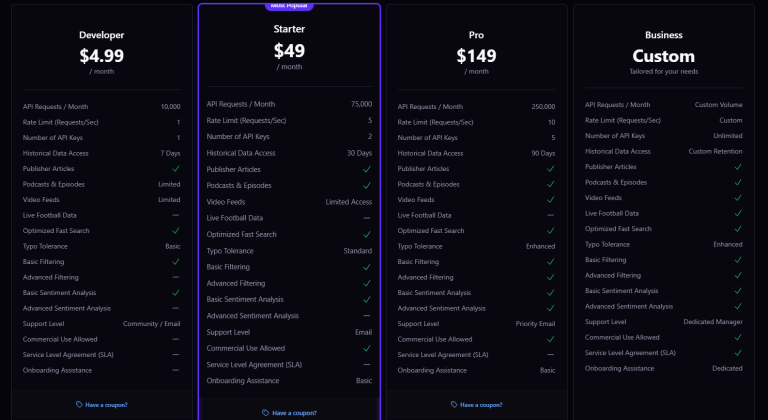
The Developer plan runs $4.99/mo for 10,000 requests, with no card required to start, and commercial use is included on every tier. Starter and Pro add request volume and history depth if you’re pulling from more sources at higher frequency, without changing the shape of the response you’re already working with.
For the full RSS 2.0 tag reference, including which elements are required versus optional, the Wikipedia entry on RSS is a solid starting point before you go source-diving through publisher feeds yourself.
Frequently Asked Questions
What does a basic RSS feed format example look like?
A root <rss> tag wrapping a <channel> element, which contains one <item> per article with at minimum a title and link, plus usually a publish date and description.
What’s the difference between RSS 2.0 and Atom feed format?
Atom is a newer, stricter XML-based spec with mandatory unique IDs per entry and ISO 8601 dates, while RSS 2.0 is looser about required fields and uses RFC 822 dates.
Are all RSS feeds formatted the same way?
No. Most follow the RSS 2.0 base spec but vary in which optional fields they include, whether they add vendor-specific namespaces, and how consistently they escape special characters.
Why does my RSS parser break on some feeds but not others?
Usually an unescaped special character, an unexpected namespace tag, or a missing optional field your code assumed would always be present.
What date format do RSS feeds use?
RSS 2.0 specifies RFC 822 format for pubDate, though in practice feeds vary, and some omit the date entirely since it’s technically optional.
Is there a tool to validate RSS feed format?
Yes, several online RSS validators check a feed URL against the spec and flag malformed XML, missing required elements, or encoding issues.
Can I get news data without dealing with RSS format quirks at all?
Yes. A content aggregation API like LumenFeed normalizes articles from many sources into consistent JSON, so format inconsistencies between publishers are handled before the data reaches you.